Digital Tools for Indian Manufacturers
A practical map of the digital tool categories small and mid-sized Indian manufacturers use — accounting, invoicing, compliance, inventory, production and communication.
Table of contents
Quick answer: Start with the task causing the most rework, often invoicing and stock, rather than buying an ERP first. The main tool categories are accounting, invoicing, compliance, inventory, production and communication. E-way bills can be generated directly on the official portal, so special software is optional.
Ask ten small manufacturers what software they use and you will hear ten different answers — an accounting package, a few spreadsheets, a WhatsApp group for orders, a register for the gate, and the official portals for GST and e-way bills. That patchwork is normal. The question is not whether to "go digital" but which gaps are costing you the most, and which category of tool fixes each one.
This guide maps the main categories, what each actually solves, and how to decide what to adopt first. It deliberately does not rank brands. The right product depends on your size, sector and budget, and any comparison would date quickly.
Start with the problem, not the product
Before looking at any tool, list the three tasks in your business that most often go wrong or take too long. For most manufacturing MSMEs, they fall into a few buckets:
- Invoices take long to prepare or have errors
- Nobody knows the exact stock of raw material or finished goods
- E-way bills are made in a rush at dispatch
- GST return preparation is a monthly scramble
- Production schedules live in one person's head
- Payment follow-ups are irregular
Each bucket maps to a tool category below.
The main tool categories
| Category | What it handles | Signs you need it |
|---|---|---|
| Accounting software | Ledgers, GST returns data, bank reconciliation, financial statements | Month-end takes days; accountant re-types data |
| Invoicing and billing apps | Tax invoices, delivery challans, numbering, buyer/product masters | Invoice errors, duplicate numbers, slow billing |
| E-way bill and compliance tools | Preparing e-way bill data, tracking validity, reminders | Rushed or wrong e-way bills, missed cancellations |
| Inventory management | Stock levels, batch/lot tracking, reorder points | Stock-outs, excess raw material, unknown WIP |
| Production planning / MES | Work orders, machine scheduling, output tracking | Missed delivery dates, idle machines |
| ERP | Integrated accounting, inventory, purchase, sales, production | Several disconnected tools, growing volumes, multiple locations |
| Communication and CRM | Order intake, follow-ups, customer history | Orders lost in chats, irregular payment reminders |
| Documents and storage | Scanned bills, contracts, certificates | Time lost searching for papers during audits |
Accounting software
This is usually the first tool a manufacturer adopts, often because the accountant insists. It should produce the data you need for GST returns and allow exports. Check that it handles your invoice series, GST rates and HSN codes cleanly.
Invoicing and billing tools
Some businesses invoice from the accounting package; others use a separate billing app, especially when invoices are raised at the factory or on the move. The value is in masters (saved buyers and products), automatic numbering and fewer typing errors. Our guide to simplifying invoice workflows covers the process side.
E-way bill and compliance tools
The official E-Way Bill System is where e-way bills are generated, either directly or through authorised integrations. Separately, tools and apps can help prepare the data, calculate distance and validity, and keep records. For high volumes, the portal's bulk facility (via the official Excel-based tool and JSON upload) or API integration through a GSP/ERP is the route; see how to prepare invoice data for bulk processing.
Inventory and production
For manufacturers, inventory is not just finished goods — it is raw material, work-in-progress, and goods at job workers. A tool that tracks goods sent on delivery challan to a job worker helps both operations and compliance. See e-way bill rules for job work.
ERP
An ERP combines several of the above into one system. It is powerful, but it requires clean processes and a period of disciplined data entry to pay off. Many MSMEs do better adopting two or three focused tools first and moving to an ERP once processes are stable.
How to choose within a category
Use the same questions for any tool you are considering:
- Does it solve my top problem? Not a list of features — the specific problem.
- Who will use it, and on what device? A dispatch supervisor on the shop floor may need a phone app; the accountant may need a desktop.
- Can I get my data out? Exports to Excel or standard formats matter for your accountant and for switching later.
- Does it fit the official formats? For GST and e-way bills, the tool should align with the fields the official systems require, and should never claim to be a government system.
- What is the real cost? Include setup time, training, and the cost of migrating data — not just subscription fees.
- Is there support in a language and channel your team uses?
- Can I try it on real data first? A one-week trial on actual invoices tells you more than a demo.
Example (illustrative)
A Ludhiana bicycle-parts manufacturer with 30 employees lists its top three problems: invoice errors at dispatch, unclear raw material stock, and a monthly rush for GST data.
It decides:
- Keep its existing accounting software, but have the accountant set up a clean product list with HSN codes and rates.
- Add a mobile invoicing app for the dispatch desk, using the same buyer and product details, so invoices and e-way bill data are prepared at the point of dispatch.
- Start a simple shared spreadsheet for raw material stock, updated daily, and revisit an inventory tool in six months.
- Postpone an ERP until the first two changes are working.
Six months later, the owner reviews: invoice corrections are down, GST data is ready faster, and the stock sheet has shown which inventory tool features actually matter.
Common mistakes when going digital
- Buying the biggest system first. Complexity without clean processes creates new problems.
- Skipping master data setup. Every tool depends on correct buyer, product and HSN data.
- Running paper and software in parallel indefinitely. Set a cut-over date.
- Relying on one person. Train at least two people on every critical tool.
- Assuming a tool guarantees compliance. The legal responsibility stays with the business. Verify rules on the official portals.
- Ignoring data ownership. Make sure you can export your records.
Free tools to start with
You can try several tasks without installing anything: the GST calculator, HSN code lookup, GST invoice template, e-way bill eligibility checker and distance calculator. If your dispatch team works from phones, see how the E-Way Easy app approaches invoice and e-way bill preparation in how E-Way Easy simplifies the e-way bill workflow.
Official sources
Whatever tools you use, the authoritative systems are the GST portal and the E-Way Bill System. The GST tutorials site has walkthroughs that help when training staff.
Frequently asked questions
Should a small manufacturer buy an ERP first?
Usually not. Start with the area causing the most rework — often invoicing and stock — and make sure your masters are clean. An ERP makes sense once processes are stable and volumes justify it.
Do I need special software to generate e-way bills?
No. E-way bills can be generated directly on the official portal. Software and apps can make preparation faster and reduce errors, but the official system is the authority.
Sources and references
- GST portalwww.gst.gov.in
- E-Way Bill System (official portal)ewaybillgst.gov.in
- GST tutorialstutorial.gst.gov.in
This article is general information, not tax or legal advice. GST and e-way bill requirements depend on the transaction, applicable notifications and state-specific provisions. Check the official portals before you rely on it.
Written by
Bhavesh AkabariBhavesh Akabari writes the E-Way Easy guides on e-way bills, GST invoicing and day-to-day compliance workflows for Indian manufacturers, wholesalers and traders. Every compliance article is checked against official GST and e-way bill sources and carries a "last verified" date.
Related articles
How Manufacturers Can Simplify Invoice Workflows
A practical way for small and mid-sized manufacturers to cut invoice errors and delays by fixing masters, numbering, review steps and the hand-off to dispatch.
By Bhavesh Akabari · · 7 min read
How to Prepare Invoice Data for Bulk Processing
Set up a clean invoice spreadsheet, run simple validation checks and remove duplicates before you upload data for bulk e-way bills or returns.
By Bhavesh Akabari · · 6 min read
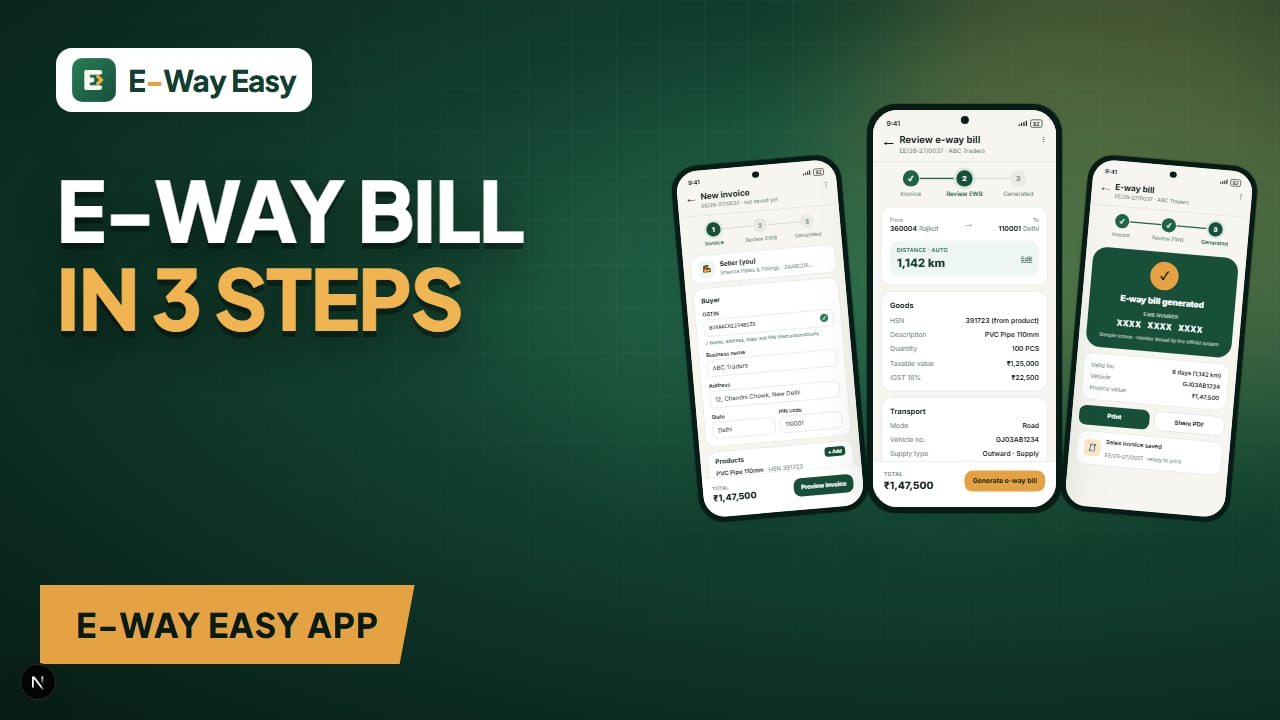
How E-Way Easy Simplifies the E-Way Bill Workflow
A walkthrough of the E-Way Easy Android app: one-time setup, the 3-step Invoice → Review EWB → Generated flow, invoice PDF import and managing e-way bills.
By Bhavesh Akabari · · 6 min read